
Omnichannel service · CRMDAY One
Every channel your clients use, one conversation.
Phone, SMS, WhatsApp, email and social messages arrive in the same inbox, beside the client, the policy and the next step — so the answer never depends on who owns which app.
Live inbox
One inbox
Client context · owner · next step
Voice · Calls and voicemail
Nancy Brooks
Missed call · 2 min ago
Illustrative view. Channels available depend on your plan and setup.
Channels
Five ways in. One history.
Clients do not care which tool your agency bought. They call, they text, they message on WhatsApp, they reply to an email and they DM you on Instagram — often about the same policy.
Voice
Phone
Calls connected to the client record, with the activity and the next action in the timeline.
Text
SMS
Reminders, document requests and follow-up as part of a structured process.
Messaging
WhatsApp
The channel clients actually answer, with the conversation beside the policy.
Inbox
Email
Threads, attachments and signed forms in the same relationship history.
Instagram · Facebook
Social
Direct messages from social reach the same queue as every other channel.
Channel availability and setup vary by plan, country and provider.
The shared inbox
A team inbox that keeps the client in view.
Every conversation carries who the client is, what they hold, who owns the relationship and what has to happen next.
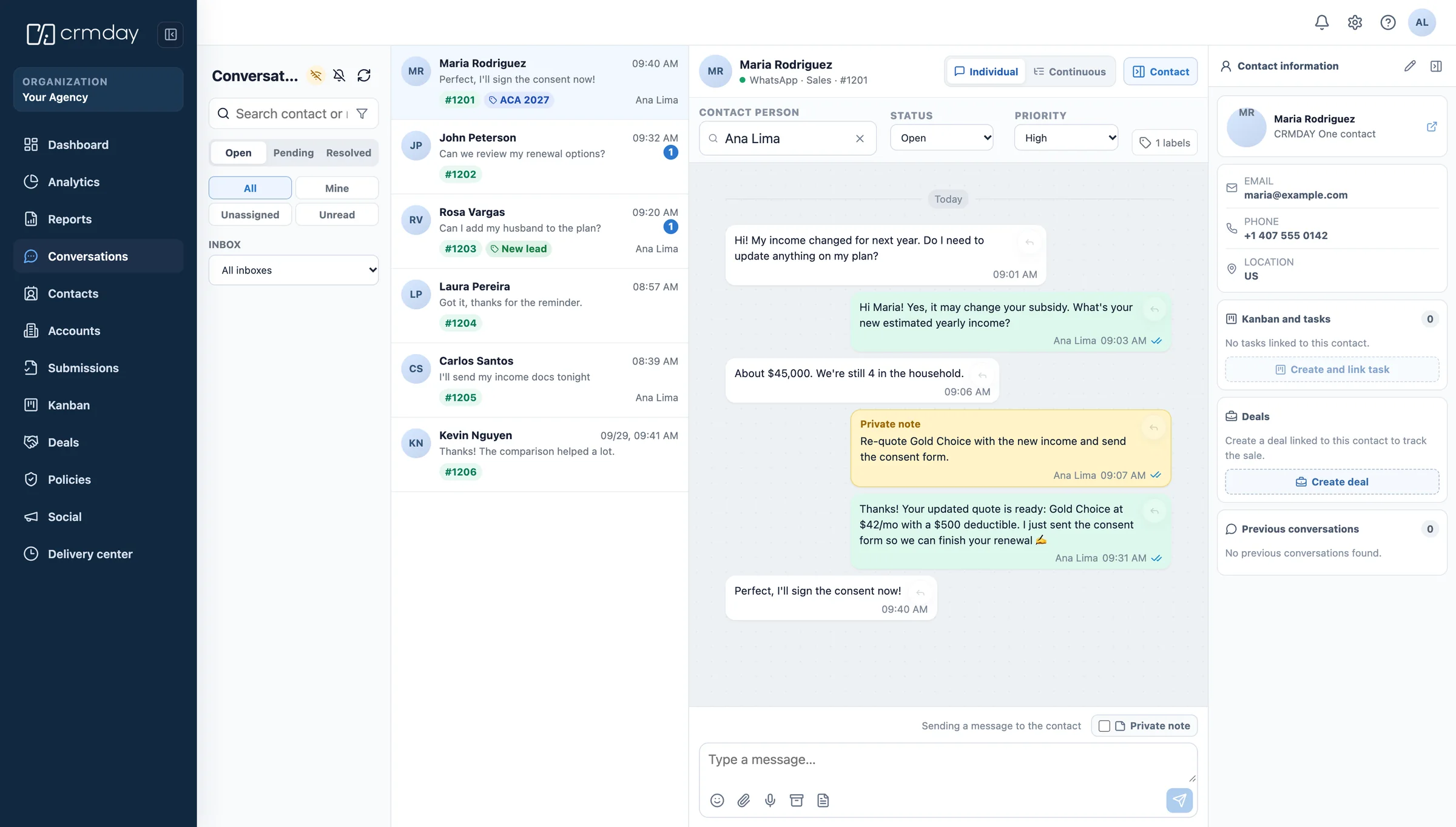
Assignment
Owner and priority
Conversations are assigned, not left for whoever opens the app first.
Notes
Private notes and labels
The team talks about the case inside the thread, without the client seeing it.
Context
Client, tasks and policies
Contact, policies, tasks and deals sit beside the chat while you answer.
From message to work
A message that matters becomes a task.
Service is not only answering. What arrives in the inbox turns into documents collected, policies updated and follow-up that actually happens.
Routing
To the right person
By channel, agency, product line or the producer who owns the client.
Tasks
Next step attached
Turn a conversation into a task, with owner and due date on the record.
Documents
Files on the policy
Documents sent over any channel land on the client, not in a phone gallery.
History
One timeline
Calls, messages and emails read as a single history, whoever answered.
Automations handle the repeatable part — confirmations, reminders, document requests — and Aria drafts with the client context in front of it, so your team spends the day on the conversations that need a person.
- 1
Speed
First response
Automatic acknowledgement and routing while the team picks the conversation up.
- 2
Campaigns
Scheduled outreach
Renewal, Open Enrollment and document campaigns across channels.
- 3
Aria
Drafts with context
Suggested replies that already know the client, the policy and the pending item.
Consent and records
Conversations your audit can read.
Messaging clients about health coverage is a regulated conversation. The inbox keeps consent, opt-out and the full exchange attached to the client record.
Consent
Opt-in on record
Consent to contact stored with the client, where the audit will look for it.
Opt-out
Stop means stop
Opt-out requests respected and visible to the whole team.
Privacy
HIPAA-minded handling
Controlled access to conversations and documents that carry health information.
Messaging features depend on carrier, provider and country rules, including US A2P registration for SMS.
Connected workflows
Service is where retention is decided.
What is omnichannel service for an insurance agency?
It is handling phone, SMS, WhatsApp, email and social messages in one place, with the same client context and history behind every answer.
The point is not having five channels. It is that the client never has to repeat themselves, and your team never has to guess what was promised on another app last week.
FAQ
Omnichannel service in CRMDAY One.
Which channels can my agency use?
Phone, SMS, WhatsApp, email and social direct messages from Instagram and Facebook. Availability and setup depend on your plan, your country and the provider behind each channel.
Does the conversation stay connected to the client?
Yes. Every conversation is attached to the contact, with their policies, tasks and documents beside the thread, and the history stays on the record after the conversation ends.
Can the team work the same inbox without stepping on each other?
Conversations have an owner, a priority and labels, plus private notes the client never sees, so two agents do not answer the same person twice.
Can I send campaigns and reminders?
Yes. Renewal, Open Enrollment and document reminders can be scheduled across channels, with consent and opt-out respected on the client record.
Does AI answer for me?
Aria drafts replies with the client context and can handle repeatable steps, but your team keeps control of what goes out and when a person takes over.
CRMDAY One · free trial
Answer everywhere, lose nothing.
Bring every channel your clients use into the same operation as your policies and renewals.
No credit card required